Xtream Codes, M3U Playlists & Stalker Portal Codes — Tested & Updated Daily
Every code page shows real numbers: live channel count, VOD and series size, publish date, expiry date and server latency. Take a free trial, or unlock the full catalogue with a membership. Binge Hit Series. Free Xtream codes and daily xtream codes are published every 24 hours — server host, username and password for every Xtream Codes player, tested before listing.
XtreamTech publishes free, working access credentials for IPTV: Xtream Codes (server host, port, username and password), M3U playlist URLs, and Stalker/MAG portal URLs. The catalogue is refreshed every 24 hours.
- Each code page shows live numbers: channel count, VOD and series size, publish date, expiry date, and latency tested within the last day.
- The refresh runs daily; codes that no longer work are replaced with tested ones in the next cycle.
- Stalker portal pages include the MAG box and MAC portal setup needed to load a portal URL.
Latest Premium Xtream & IPTV Codes
Freshly updated high-speed Xtream Codes, M3U playlists, and VIP Stalker portals. Verified daily for low latency, active streams, and comprehensive channel availability.

Favorite High Speed Lithuania iptv stalker – November 2026
LINE-ACTIVATION Stalker review for Lithuania: 4,321 live channels, 4,203 movies, 126 series, H.264/HEVC support, and a verified 959ms handshake.
Cheap ministra player code for AuraHD 5 with 9263 dump – November 2026
Set up WOWTV on AuraHD 5 with Miniastra using Stalker portal authentication, a 9263-channel dump, and practical streaming tips.
VIP Sudan iptv stalker with 14517 access – November 2026
Test VIP Sudan IPTV Stalker with 14517 channels. DINOFOX portal review: 40944 VOD, H.265 support, and setup guide.
Premium iptv stalker code with New release movies live streaming channels – November 2026
DRU4 Stalker Portal review: 5,412 live channels, 25,079 films and series, 4K-ready streams, and setup guidance for major players.
Affordable stalker middleware with access to Family movies streaming packages – November 2026
Test OKTIVI IPTV: 21,546 live channels, 106k VOD titles, and stable Stalker middleware. Check our full latency and codec review here.
Ultimate stb code with Server Load Balancing – November 2026
VUEOTT Stalker Portal review covering 15,088 live channels, 32,630 movies, server performance, device setup, and premium support.
Paid stb code for iPad with 4819 live stream channels – November 2026
Tested CWDN IPTV on iPad: 4819 live channels, 33k VOD, Stalker portal setup, latency benchmarks, and premium access tips for smooth streaming.
iptv stbemu code with Swedish SD/HD/4K mix – November 2026
Tested IPTVHUNT Stalker Portal: 14k channels, 4K HEVC support, and low-latency streaming. Full setup guide for smart TVs and Android boxes.




Latest guides & tools
Fresh Free Xtream, M3U & Stalker Playlists
Daily updated public IPTV playlists and server credentials. Test live channel stability, server speeds, and format compatibility directly before streaming.
Test period IPTV For 9 Days On MAG 354W3 – November 2026
TRUSTDIGI 9-day IPTV test on MAG 354W3: 29,262 channels, 80,316 movies, Stalker setup, performance, and limitations.
7-Day Free Venezuela mag 322 portal with 20822 TV everywhere – November 2026
Explore the 7‑day free Venezuela MAG 322 portal on LINEHUNT – 20,822 live channels, 29,918 VOD titles, HEVC streams and low‑latency performance for ultimate IPTV testing.
14-Day Trial Pro iptv server with ES TIVIFY complete list – November 2026
Review the PROCDNNET 14-Day Trial IPTV server featuring 17,108 live channels and 42,682 VODs. Experience stable Stalker portal streams with low latency.
Trial access IPTV For 18 Days with Sinhala digital TV – November 2026
Tested FLUXVIPTRX 18-day trial: 20,655 channels, 4K BeIn Sports, and 46k VOD titles. Full setup guide for Stalker portal & IPTV Smarters.
No credit card needed IPTV For 14 Days with 20200 daily archives – November 2026
Explore SIMPLETV’s 14‑day, credit‑card‑free IPTV trial with 20,200 live channels and 27,005 VOD titles, all delivered via Stalker portal.
IPTV For 6 Days – November 2026
Review of TV83 IPTV 6-day trial: 9980 live channels, 28k VOD titles, Stalker portal authentication. Fast handshake, HEVC support, and premium sports PPV access.
Gratis IPTV For 2 Days – November 2026
AIOTV gives you 2 days of Stalker Portal IPTV with 21,263 live channels, 44,633 movies and 18,393 series — a full 48-hour test of one of the largest free trials available.
Test period IPTV For 11 Days with Filipino Pinoy TV directv channels – November 2026
Test 103.176.90.141 Stalker Portal: 11,262 live channels, 200k VOD, and 11-day trial with low latency and HEVC support for seamless streaming.





Pick the one your player needs
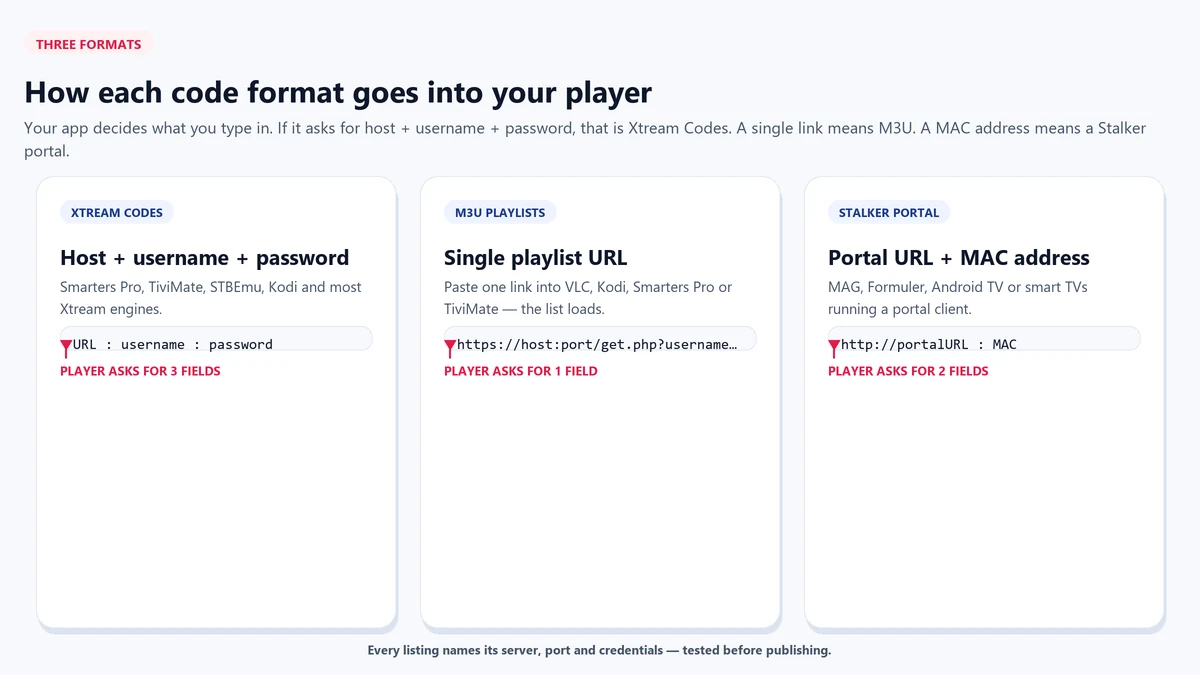
Your app decides what you type in. If it asks for host + username + password, that is Xtream Codes. A single link means M3U. A MAC address means a Stalker portal.
Host + username + password
Works with Smarters Pro, Tivimate, STBEmu, Kodi and most Xtream engines. The host line is one of our Xtream servers — every listing names its server, port and credentials so your player connects on the first try.
Single playlist URL
Paste it into VLC, Kodi, Smarters Pro or Tivimate and the channel list loads.
Portal URL + MAC address
For MAG boxes, Formuler, Android TV and smart TVs running a portal client.
How to use Xtream Codes in Smarters, TiviMate or STBEmu
An Xtream Codes login is three or four short values — a server (host), a port, a username and a password — that tell your player where to pull the channel list. Every listing on this site names its server, port and credentials, so you copy them straight into your app instead of guessing.
Server, port, username, password
The server is the host line, written as a full URL with a scheme such as http://server.example. The port is the number after the host — commonly 80, 8080, 25461 or 8000 on Xtream lines — and many players fold it into the host as http://host:port. The username and password are the account on that server, pasted exactly as listed. If your app has no separate port box, keep the port in the host line.
Connect in Smarters Pro
Open Smarters Pro and choose Add New User, then Login with Xtream Codes API. Give it any name, paste the server URL, then the username and password from the listing. If your version shows a port field, enter the port there and leave it out of the server line; otherwise keep http://host:port. Tap Add User, then the app downloads the channels, VOD and EPG before the home screen loads.
Connect in TiviMate
In TiviMate go to Settings › Playlists › Add playlist and pick Xtream Codes rather than M3U. Enter the server address (host plus port), the username and the password from the listing, then confirm and let TiviMate process the channel list. The TV guide (EPG) is grouped under Settings › EPG; assign the source TiviMate detected so times line up.
Connect in STBEmu
STBEmu works on the MAC/portal model rather than the Xtream API. Under Profiles › Portal settings, enter the portal URL and the MAC address from the listing, then restart the profile to load the portal. Some versions accept an Xtream portal in the portal-URL field and read the username and password from the profile; use whichever fields your build shows. If you have a MAG box, set the same portal URL under Servers › Portals.
Switch servers when a login stops working
Servers rotate: a trial line is shared, and a server that responded yesterday may be full or retired today. A dead server usually times out or shows a connection error before any login is attempted, while a wrong password connects and then returns invalid credentials — so read the message. To move on, pick the next free code from the "Latest free codes by format" list above and enter its host, port and credentials in the same profile. No need to reinstall the app.
Common problems
Login failed / invalid credentials
Re-type the username and password with no trailing spaces, confirm the port, and check the code page publish and expiry dates. An expired trial keeps the old credentials and must be swapped for a fresh code.
No channels, or EPG empty
The login worked but nothing loaded: refresh the playlist, then in TiviMate or Smarters re-run "update channels". For an empty guide, open EPG settings, assign the detected source and refresh. Channels count is shown on each code page.
Buffering
First test your own connection, then switch to the next listed server — shared trial lines buffer when busy. Lowering the stream quality or moving closer to the router usually explains the difference between a bad server and a slow line.
Read a full walkthrough of the format in our latest Xtream code listing, or check any playlist URL first with the M3U Link Checker.
Latest free codes by format
Three live lists pulled straight from the site — free Xtream logins, free M3U playlists and free Stalker portals.
Free Xtream IPTV playlists & public code playlists
Every free Xtream code works as a free public Xtream code playlist source: load the host, username and password into any Xtream Codes player, or pull the same channels as a free Xtream IPTV playlist in M3U format. Playlists are refreshed daily — codes that stop working are replaced in the next cycle. Browse the free sections: free Xtream codes, free M3U links, and free Stalker portal codes.
Free Xtream Codes Newest


Free M3U Links Newest


Free Stalker Portals Newest
What you get with each option
| Feature | Free code | Premium membership |
|---|---|---|
| Credentials shown | Open on the code page — copy and use | Unlocked in your Members Area |
| Validity | 2–3 week trial windows (current: to 21 Nov 2026) | Long-running — current portal to 07/2027 |
| Channels & VOD | Rotating trial line-ups | 13,048 channels, 60,784 VOD, 20,154 series |
| Server quality | Shared trial servers | Premium servers for stable HD/4K |
| Support | Standard email | 24/7 on every plan |
| Devices | One connection | All your devices at once |
Every code page lists its own publish date, expiry date and latency reading — always check before you configure a player.
One price, every format
Unlock every premium code page on XtreamTech — Xtream, M3U and Stalker, plus your personal dashboard.
1 Month
3 Months
6 Months
12 Months
Lifetime
Pay by crypto, gift card, bank transfer or PayPal. Refund policy applies.
From payment to live TV in four steps
Choose a plan
Monthly, quarterly, half-year, yearly or lifetime — all include the full premium catalogue.
Pay your way
Crypto, gift card, bank transfer or PayPal. Membership activates automatically.
Open Members Area
Your subscription, expiry date and renewal button sit in one dashboard.
Pick a code and watch
Choose any premium code, copy the details into your player and start watching.
Works on your existing devices
StbEmu, TiviMate and every mainstream Xtream codes player are supported — free StbEmu code IPTV Xtream trials use the same host/user/password layout shown on each code page.
Frequently asked questions
What is an Xtream Code?
Three details your player needs: server URL (host), username and password. Each code page shows them with a copy button.
My player asks for a MAC — what is that?
A Stalker portal. Use the portal URL and MAC address from the code page together on your MAG, Formuler or smart TV.
How often are new codes published?
Every day. Each code page shows its own publish and expiry dates so you always know how fresh it is.
Can I try before I buy?
Yes — free codes are available to test your setup. Each code has a limited validity window, and availability depends on server capacity.
What does premium give me?
Premium credentials unlock in your Members Area with longer validity. The current portal has 13,048 live channels, 60,784 VOD titles and 20,154 series, plus premium servers, all devices and 24/7 support.
How do I check a playlist without paying?
The M3U Link Checker opens any playlist URL, reports which streams work, and can convert between formats.
What payment methods?
Crypto, gift cards, bank transfer and PayPal. Gift card balances stay in your account until you activate a plan.
What is your refund policy?
Because delivery is instant, sales are final unless: no delivery within 24–48 hours, fault unresolved after 72 hours, duplicate payment within 48 hours, or materially different service. Full policy here.
What are Xtream servers and which one do I use?
Each listing runs on one of our tested Xtream servers. The code page shows the exact server host and port alongside the username and password — copy all three into your player. Latency is measured within the last day, so the fastest server for your region is the one listed as tested.
Can I get a free public Xtream code playlist?
Yes. Every free Xtream code doubles as a playlist source: the host, username and password resolve to a full channel list in any Xtream Codes player or M3U-capable app. The free sections refresh daily.
Do daily Xtream codes rotate?
Yes — new daily Xtream codes are published every 24 hours and expired ones are removed. Each page shows its own publish and expiry date so you can see how fresh a code is.
Where can I see the full Xtream IPTV channel list?
Each code page lists the live channel count and VOD size measured at publish time — for example 13,048 live channels and 60,784 VOD titles on the current premium portal. The numbers update on every refresh.
How do I connect an Xtream Codes player?
Open your player, choose Xtream Codes API (or add a playlist as Xtream Codes), then enter the server host with its port, the username and the password from the code page. Save the profile and let the app download the channel list and EPG. Smarters Pro calls it “Login with Xtream Codes API”; TiviMate calls it “Add playlist › Xtream Codes”.
Which Xtream server should I pick?
The one named on the code page you are using — each listing runs on a single tested server and shows its host and port next to the username and password. Latency is measured within the last day, so the listed server is the fastest tested option for that code. If it stops responding, switch to the next code in the free list rather than guessing a new host.
How do I use daily Xtream codes?
Pick a fresh code from the "Latest free codes by format" list, note its server, port, username and password, and enter those four values in your player. New daily Xtream codes are published every 24 hours and expired ones are removed, so check the publish and expiry dates on the code page before you configure — a code that no longer logs in has usually expired and should be replaced.
Already a member?
Your subscription, expiry date and renewal options are in your Members Area, together with the latest premium codes across all formats.
- Credentials unlock on every premium code page
- Subscription status and renewal in one dashboard
- Use on every device you own
- 24/7 support on all plans
Quick links
Membership & prices · Members Area · M3U Link Checker · Contact · WhatsApp · Telegram
Legal
About · Contact · Refund Policy · Terms of Use · Privacy Policy · DMCA · Disclaimer
XtreamTech is an independent IPTV listing and review site. We publish code pages with publish dates, expiry dates and measured latency. XtreamTech is not affiliated with any broadcaster, rights holder or hardware manufacturer; channel availability depends on the package you choose. © 2026 XtreamTech.